Ikhnos
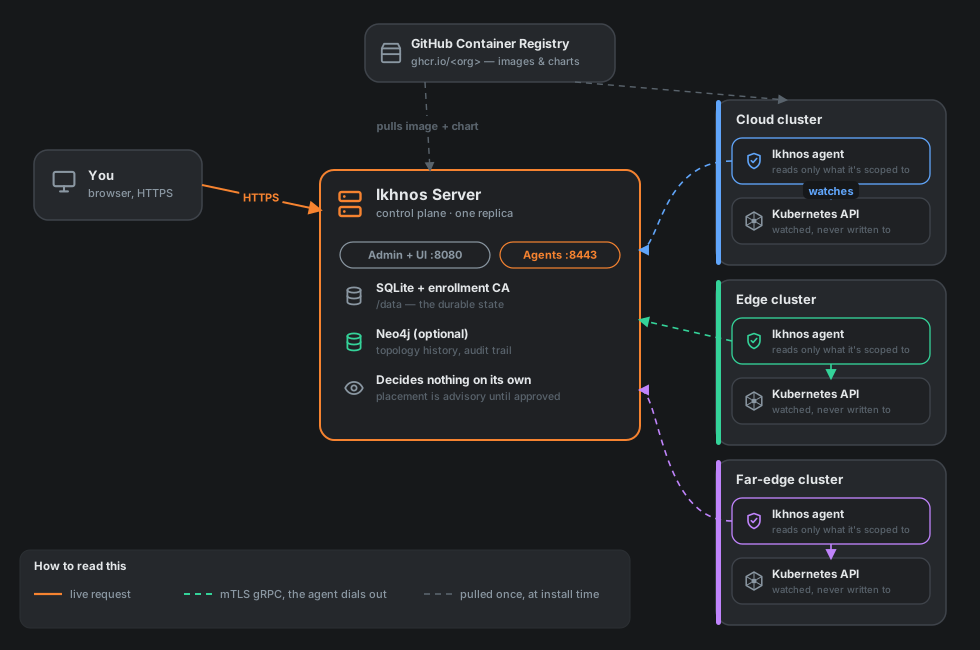
Ikhnos models your Kubernetes clusters across the cloud-to-far-edge continuum and shows them to you as two connected views: an Application view (your services, grouped by cluster, with the dependencies between them) and an Infrastructure view (the nodes underneath, grouped the same way). Both are projections of one model, kept up to date by a small read-only agent you install in each cluster.
:::note The name
Ikhnos (ἴχνος, "footprint, trace") was called Continuum until recently. Names that existing installs depend on keep the old spelling on purpose: the continuum-agent chart and release, the continuum-system namespace, CONTINUUM_* environment variables, continuum.* telemetry attributes, X-Continuum-* headers, certificate names and the continuum binary. Where a command or value in these pages says continuum, that is why.
:::
It does not deploy anything, and it does not move anything on its own. What it gives you is the picture — where things run, how healthy each cluster is, what talks to what, how far apart your sites really are — plus a Placement page that recommends where a service would run better and explains exactly why, with every recommendation showing its evidence and its confidence. Nothing moves until a person with the right role approves it.
Who this is for
If you operate clusters that span more than one place — a managed cloud region and a rack of edge boxes, say, or a handful of far-edge sites with unreliable links — and you want one picture of all of it plus a second opinion on where things should run, this is built for you. It also doubles as a research testbed: the placement engine is pluggable, so you can point it at your own decision logic (a heuristic, a model, whatever you're studying) and compare it against the built-in baseline on the same estate, side by side.
The shape of it
- A server (the control plane): one replica, a small durable store, a web UI, and a JSON API. It never holds a kubeconfig and never calls into your clusters.
- An agent per cluster: a small pod with cluster-wide read-only RBAC. It dials out to the server over mutual TLS and reports what it sees. Revoking it, narrowing what it reports, or removing it entirely never touches the server's own security — the trust runs one way.
- Three tiers, always in this order: what the agent's RBAC lets it see (the ceiling), what an administrator has agreed to receive (approved), and what the agent is actually sending right now (effective). The server can only ever narrow that chain, never widen it — widening always needs a
helm upgradeon the cluster's own side.
Where to go next
If you just want it running, skip straight to Getting started — there's a single copy-paste recipe that works on any cluster. Architecture explains the two-listener design and the trust model in more depth, User guide walks through the UI once the server is up, and Troubleshooting covers the handful of mistakes that are easy to make once and never again.
Contributing covers building from source, running the test suite, and how releases are cut.