Exposing the agent port
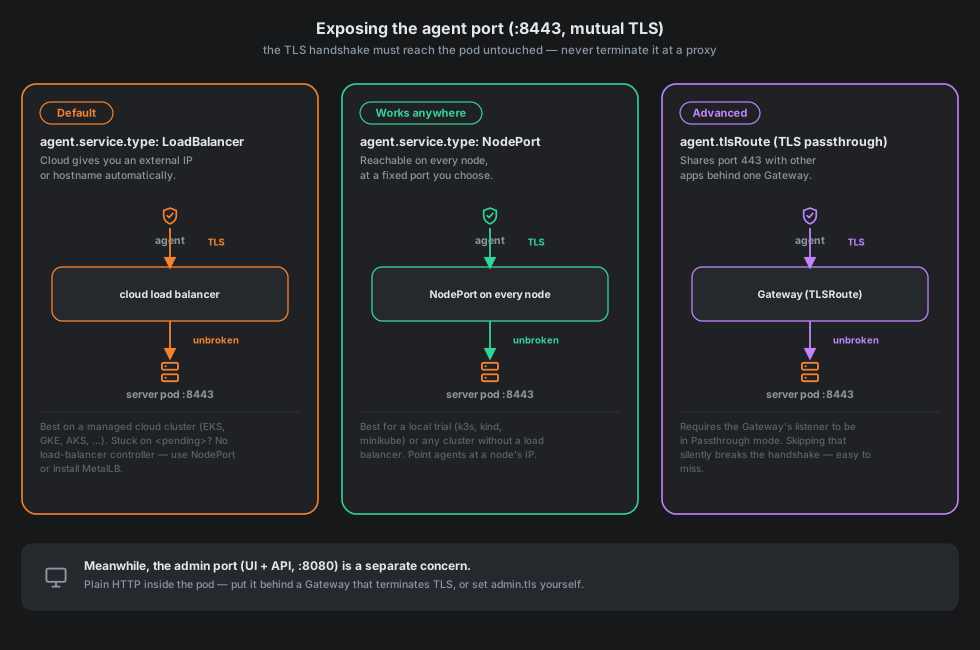
The agent port speaks mutual TLS gRPC, and the handshake — client certificate, server certificate, the works — has to arrive at the server pod exactly as the agent sent it. Anything that terminates TLS in front of it (an HTTP-aware ingress controller in its default mode, an ALB doing HTTPS-to-HTTP, a service mesh sidecar rewriting the connection) breaks the handshake, usually with an error that doesn't obviously point back at "TLS was terminated somewhere." That one rule is why this port is exposed differently from the UI.
LoadBalancer (agent.service.type=LoadBalancer, the default)
The chart asks your cloud for an external IP or hostname automatically. This is the right default for a managed cluster — EKS, GKE, AKS and similar all provision one without extra setup. If EXTERNAL-IP stays <pending> after a couple of minutes, there's no load-balancer controller available (common on a bare-metal or fully self-managed cluster); switch to NodePort, or install something like MetalLB to get LoadBalancer support anyway.
NodePort (agent.service.type=NodePort)
Reachable on every node, at a fixed port you choose. This works on literally any cluster — including a local trial with k3s, kind or minikube — which is why it's what the Quickstart uses. The trade-off is that you're pointing agents at a specific node's address rather than a stable name a load balancer would give you, so it's a better fit for a trial or a small, self-contained deployment than for something agents will dial from far outside a network you control.
Gateway API TLSRoute (agent.tlsRoute)
Lets the agent port share the same :443 a Gateway already uses, routed by SNI hostname rather than terminated: a TLSRoute attached to a Gateway listener configured with protocol: TLS and tls.mode: Passthrough. It needs the Gateway API CRDs and a Gateway already running in the cluster — if you don't have either yet, LoadBalancer or NodePort are the simpler starting points. The Gateway becomes the only front door for the agent port, so agent.service.type also switches to ClusterIP — the chart refuses to install or upgrade with agent.tlsRoute.enabled=true and a LoadBalancer or NodePort still sitting next to it, since that would quietly leave a second, unintended way in (and, on a cloud LoadBalancer, a second bill for it).
helm upgrade continuum-server oci://ghcr.io/alexandrosst/continuum-server \
  --namespace continuum --reuse-values \
  --set agent.service.type=ClusterIP \
  --set agent.tlsRoute.enabled=true \
  --set-json agent.tlsRoute.parentRefs='[{"name":"shared-gateway","namespace":"gateways","sectionName":"agents-tls"}]' \
  --set-json agent.tlsRoute.hostnames='["continuum.example.com"]'
Skip the Passthrough mode on the Gateway's listener and nothing errors loudly — it just quietly terminates TLS anyway, and the agent's handshake fails in a way that looks like a networking problem rather than a one-line misconfiguration. This is the most capable option (no extra load balancer, shares infrastructure you already run) and also the easiest to get subtly wrong, which is why it's marked advanced rather than default.
TLSRoute graduated to Gateway API's stable Standard channel in v1.5 (April 2026); check which apiVersion your specific Gateway implementation actually serves it at (agent.tlsRoute.apiVersion defaults to gateway.networking.k8s.io/v1alpha2 for the widest compatibility) before relying on a newer one. It isn't any single project's feature to deprecate out from under you — it's part of the Gateway API spec itself, implemented by whatever Gateway controller you're already running (Envoy Gateway, Istio, Cilium, NGINX Gateway Fabric, and most cloud-managed Gateways all support it). This is also why this chart uses Gateway API rather than classic Ingress for TLS passthrough: Ingress's most common implementation, the ingress-nginx controller, itself reached end-of-life in March 2026 (no further releases, bug fixes or security patches) — a concern that doesn't apply to a spec implemented by many independent, still-maintained projects.
The admin/UI port has the same shape: httproute is the Gateway API HTTPRoute for the UI, covered in Production cluster.
Already run your own reverse proxy?
If nginx, Traefik, Caddy or similar already sits in front of your cluster, the two ports still want opposite treatment — your proxy fits naturally into one of them and not the other:
- The admin port is exactly what a reverse proxy is for: point it at the server's admin Service and terminate TLS there, then add
--set admin.behindTlsProxy=trueso the chart serves plain HTTP behind it instead of generating its own certificate. This is no different from putting any other web app behind a proxy. - The agent port cannot go behind that same proxy — not because of a chart limitation, but because terminating TLS is the one thing a reverse proxy normally does, and that's exactly what breaks mutual TLS gRPC (see above). You have two ways to still use one entry point:
- Simplest: let it bypass your proxy. Point a LoadBalancer or NodePort straight at the agent port, on its own address or port, and leave your reverse proxy out of that path entirely. Agents dialing a different port than browsers do is normal, not a workaround.
- One address for everything, still no termination: if your proxy supports raw TCP/SNI passthrough (nginx's
streammodule, Traefik's TCP routers, Caddy'slayer4), point that at the agent Service without touching TLS — the same idea as Gateway API TLSRoute above, just configured in your proxy instead of in-cluster. Gateway API TLSRoute is the better-tested path if you're open to running a Gateway controller; reserve your own proxy's TCP passthrough for when you'd rather not add one.
Configuring SNI passthrough in nginx, Traefik, and Caddy
Same idea as the TLSRoute example above — route on the SNI hostname from the client's TLS ClientHello, and hand the connection to the agent Service without touching TLS at all.
nginx, in the stream module (not http), with ssl_preread on; so nginx reads the SNI hostname before it has decided where to send the connection:
stream {
    map $ssl_preread_server_name $agent_backend {
        continuum.example.com  continuum-agent.continuum.svc.cluster.local:8443;
        default                continuum-agent.continuum.svc.cluster.local:8443;
    }

    server {
        listen 443;
        ssl_preread on;
        proxy_pass $agent_backend;
        proxy_protocol on;  # see "Passthrough loses the client's own address" below
    }
}
Traefik, a TCP router matching on HostSNI with tls.passthrough: true so Traefik routes on SNI without terminating:
tcp:
  routers:
    continuum-agent:
      rule: "HostSNI(`continuum.example.com`)"
      entryPoints:
        - agent-tls
      tls:
        passthrough: true
      service: continuum-agent

  services:
    continuum-agent:
      loadBalancer:
        proxyProtocol:
          transport: true  # see "Passthrough loses the client's own address" below
        servers:
          - address: continuum-agent.continuum.svc.cluster.local:8443
Caddy, via the third-party layer4 app (not the built-in reverse_proxy — it needs a custom build, e.g. with xcaddy), matching SNI with a named matcher and routing on it:
{
    layer4 {
        :443 {
            @agent tls sni continuum.example.com
            route @agent {
                proxy_protocol  # see "Passthrough loses the client's own address" below
                proxy continuum-agent.continuum.svc.cluster.local:8443
            }
        }
    }
}
Whichever you pick, once the real address is live, Settings → Server address in the UI turns it into the exact helm upgrade command for your release — you don't have to reconstruct it from these docs by hand (see The two-step address problem).
Passthrough loses the client's own address unless the proxy sends it separately
A LoadBalancer or NodePort with nothing else in the path hands the server the agent's real source address, same as any direct TCP connection would. The moment something forwards the connection on your own infrastructure — your reverse proxy's TCP passthrough above, or occasionally a load balancer mode that source-NATs — that stops being true: the server sees the forwarder's address, not the agent's. That address is what powers the approval card's "from X.X.X.X" line, per-address rate limits, the audit trail, and the location an agent is suggested to be at, so losing it isn't cosmetic.
TLS is still what's passed through unbroken (nothing in this section terminates it), so there's no HTTP request to carry a header on the way in — the fix is PROXY protocol instead, a short preamble (v1 text or v2 binary — either is fine, the server accepts both) most TCP/SNI-passthrough proxies can be configured to send ahead of the connection: proxy_protocol on; in nginx's stream module, proxyProtocol.transport: true on a Traefik TCP router, proxy_protocol in Caddy's layer4. Once your proxy sends it, pass --set agent.behindProxy=true (CONTINUUM_AGENT_BEHIND_PROXY=true) so the server actually trusts it: with that set, every connection is required to carry a valid header — one that doesn't is refused outright, since accepting it without one would defeat the point of trusting the header at all. Leave it unset (the default) whenever nothing forwards the agent connection, which includes plain LoadBalancer, NodePort, and Gateway API TLSRoute — the common cases need nothing here.
None of this helps when there's no forwarder to fix in the first place — an agent and the server genuinely sharing one network (a home lab, a single on-prem site), where the connecting address is private because the traffic never leaves that network at all. There is no address to recover there, PROXY protocol or not. If you'd still like a location shown rather than none, --geoip-public-ip-service (needs --geoip-db) is a different, explicitly opt-in fallback: the server asks a public "what is my address" service (of your choosing) for its own public IP once in a while, and estimates that agent's location from it — correct exactly when the two share a network, which is the case this is for. Every result from it is marked estimated and never better than low confidence. See geoip.publicIpService in the main project README for the full explanation.
Separately, --geoip-asn-db (also needs --geoip-db) adds which network a connecting address belongs to — its AS number and the organisation behind it — alongside wherever the location ended up, real or estimated. It reads a second, ASN-shaped offline database (GeoLite2-ASN, DB-IP ASN Lite), makes no network call of its own, and is often steadier than the place name: a VPN or a cloud provider's egress can move the city shown without changing whose network is actually carrying the traffic.
Meanwhile, the admin port
None of the above touches :8080 at all — that one is a completely separate decision, and it wants the opposite treatment: plain HTTP inside the pod, sitting behind a Gateway (httproute) that does terminate TLS (or serving TLS itself via admin.tls, if you'd rather skip a proxy entirely). Give it no certificate at all and the chart generates a self-signed one automatically rather than refusing to install — see Production cluster for the actual commands.