Observability intent
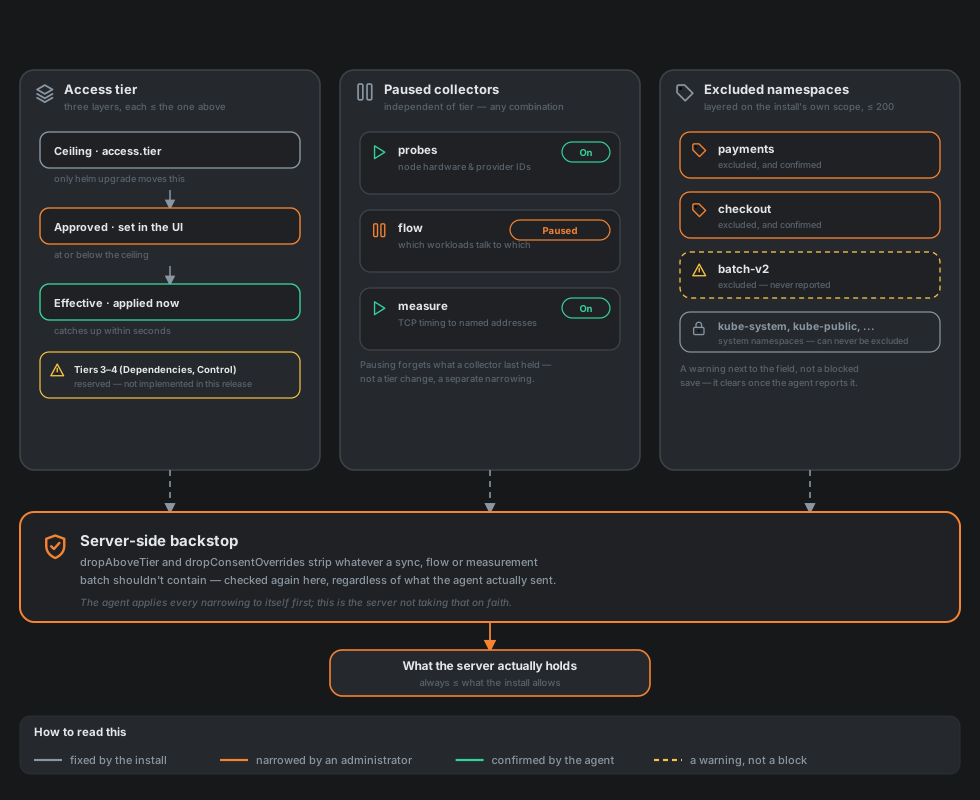
Observability intent is what the Agent insight panel calls the sum of these three settings: the scope of what one agent reads and reports, at this moment, from this cluster. It can only ever get narrower than what the cluster's own install allows — never wider — and everything on this page follows from that one rule.
Three dimensions, not one knob
An agent's actual scope comes from three independent narrowings, checked in this order every time a picture is about to be reported or accepted:
-
Access tier — how much of the cluster the agent looks at in the first place: nodes, namespaces and workloads, dependencies, live traffic. Three layers, each only able to sit at or below the one above it:
- The ceiling is
access.tierin the Helm chart. It is the one value only the cluster's own owner can move, withhelm upgrade— the server can never ask the agent to see more than this, and the agent enforces that itself regardless of what the server sends. - The approved tier is what an administrator picked in the UI, at or below the ceiling.
- The effective tier is what the agent is actually doing right now, at or below approved — usually the same, except in the seconds after a change is asked for and before the agent has caught up, or when the agent's own version is too old to report a given tier at all.
Tier Name What it adds 0 Registered only Nothing but the cluster's own existence. 1 Infrastructure Nodes, storage classes, ingress classes. 2 Services Namespaces and workloads — and, with it, everything that needs a workload identity to attach to (live traffic, below). 3 Dependencies Reserved. 4 Control Reserved. Tiers 3 and 4 are named rungs on the same ladder, not yet honoured ones:
ImplementedTierin this release is 2, and the server refuses to grant anything above it outright — "access tier 3 is not available in this release" — rather than approve something the code does not yet know how to constrain. The names describe where the ladder is going (the declared and discovered call graph, then placement actions with real effect), not a scope this release ever actually narrows into or out of.One asymmetry in this ladder is worth being explicit about, because it cuts against "the server can only narrow" in one specific way: narrowing the approved tier in the UI only narrows what the agent chooses to report, not what it is technically able to read. The chart's
rbac.yamltemplates oneClusterRoleper tier fromaccess.tierathelm install/helm upgradetime, and an agent's Kubernetes credentials sit at whichever tier the chart was last installed with — bound, whether the agent is currently using them or not — until someone runshelm upgradeagain with a loweraccess.tier. An agent narrowed to tier 0 from the UI right after being installed at tier 2 is, at the Kubernetes API level, still holding a ServiceAccount that can list nodes and read every pod in the cluster; it simply chooses not to. That gap bounds a well-behaved agent, not a compromised one, and closing it needs an actualhelm upgrade, not a setting in this panel. - The ceiling is
-
Paused collectors. Three optional collectors ship with the agent, each independently pausable without touching the tier at all:
probes(the wizard's node probe checkbox,nodeProbe.enabled— machine-identifying facts about each node: hardware and provider IDs, OS and kernel details, and the addresses on its own network interfaces, which are what lets Ikhnos offer a node's mesh or LAN address as a place to reach a regional operator; interfaces a container network creates are left out),flow(the wizard's traffic observer checkbox,flowObserver.enabled— which workloads talk to which, observed at the node level), andmeasure(the wizard's path measurements checkbox,measurements.enabled— timing of TCP connections to addresses the server names). Pausing one stops it in the cluster and forgets whatever it last held; it is not the same knob as the tier, and an agent can have a wide tier with a collector paused inside it. -
Excluded namespaces. Names layered on top of whatever the agent's own install already leaves out — its chart values can scope it to a subset of namespaces from the start (
scope.namespaces/scope.exclude/scope.selector; see Namespaces and services), and onlyhelm upgradeon the cluster's side can change that part. From the UI, an administrator can only narrow further on top of it, at most 200 names; a larger exclusion belongs in the install's own scope instead.
None of the three ever widens what the install allows. An administrator narrowing an agent below its ceiling, then later widening it back up, only ever returns to that same ceiling — never past it. Narrowing is open to editors; widening back up (raising the approved tier, lifting a pause, removing an exclusion) needs an administrator.
The server checks all three again itself
The agent applies every one of these to itself before anything leaves the cluster — that is its whole job. The server does not take that on faith. Three separate backstops sit in front of whatever a sync, a flow batch or a measurement batch actually contains, and all three are silent, defense-in-depth checks rather than something visible in the UI:
dropAboveTierstrips whatever the access tier does not cover — nodes below tier 1, namespaces and workloads below tier 2 — from a picture before it is merged into what the server holds, regardless of what the agent sent.- The same drop happens for paused collectors: a probe's machine-identifying fields are stripped field-by-field if
probesis paused, and a whole flow or measurement batch is discarded, untouched, the moment it arrives ifflowormeasureis paused — the agent should never send it, so the server never even parses it into anything it might have to unwind later. - Excluded namespaces are filtered out of a picture by name — both the namespace itself and any workload inside it — the same moment the tier check runs, before either reaches what the server stores.
An agent that ignored all three overrides entirely would still end up with a server that only ever holds the narrower picture. The one acknowledged gap is a flow naming a workload in an excluded namespace while the pause is still taking effect: the workload it would point at was never recorded, so the edge has nothing to attach to and stays inert rather than invisible, but the flow record's own key is not separately hunted down and scrubbed — tightening that further needs the flow key's namespace parsed reliably enough to trust filtering by it, which is not attempted today.
Confirmed, or still waiting
Every narrowing takes effect on the agent's side at its own pace — typically a handful of seconds, at its next report — not the instant an administrator saves it. The Agent insight panel shows whether the agent has actually caught up, not just whether the server asked: paused collectors are matched by name against what the agent's own diagnostics report, and excluded namespaces by count (the agent's diagnostics carry how many extra namespaces it is leaving out, not their names, so a same-size but different set would misreport as confirmed — an accepted, narrow gap next to what the count check is for: catching a stuck rollout or a version too old to report a narrowing at all). While unconfirmed, the panel also shows how long it has been waiting, from the moment the narrowing was last changed — so "not yet confirmed" reads as "three hours" or "five seconds," not as a guess.
The server does not wait for the agent to hold its side of it. Saving a narrowing (a collector newly paused, a namespace newly left out) cuts the picture the server already holds for that agent down at once, the same way lowering a tier does: a paused node probe's machine-identifying fields are blanked, and an excluded namespace and the workloads in it are removed. Without that, a stuck, disconnected or out-of-date agent would leave the old picture on screen until it next sent a full one. Widening drops nothing and brings nothing back; only the agent can report it again. What stays inert rather than purged is the residual named below: a flow that names a workload in an excluded namespace.
Excluded, but is it real?
Syntax is checked immediately and hard: a name has to look like a Kubernetes namespace, and the handful of system namespaces (kube-system, kube-public, kube-node-lease) can never be excluded at all, because the agent reads those unconditionally to recognise the cluster's own components. What syntax checking cannot catch is a namespace that simply is not real — a typo, or a name for something that has not rolled out yet. Both look identical at the moment the exclusion is saved.
Rather than reject either outright, the server remembers every namespace name an agent has actually reported (after the tier ceiling narrows what it is allowed to see, but before this very exclusion list narrows it further — otherwise an excluded name could never be checked against anything) and checks each excluded name against that record. A name the agent has never reported is surfaced as a warning next to the exclusion field, not a blocked save: an administrator legitimately narrowing ahead of a namespace's own rollout is a real, common case this has to allow, and the warning clears itself the moment the agent does report that name — no separate action needed, and nothing to dismiss.
Where this ends up
Every one of these changes — a tier moved, a collector paused, a namespace excluded — is versioned the same way an agent's approval or revocation is: as an event with a reason, linked to the graph's own record of what the agent looked like right after. System memory covers how that recording and linking actually works, and why an application, an agent or a namespace all end up explainable in the same Timeline view regardless of which one of them changed.